01 / OVERVIEW
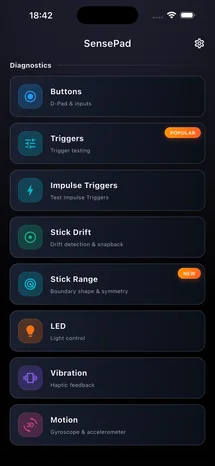
All tests in one place
Quick access to buttons, sticks, triggers, and sensors.

Know your controller. Inside and out.
Check your PS5, PS4, Xbox, or MFi controller before buying, after a repair, or when an input feels off. See buttons, D-Pad, analog sticks, adaptive triggers, vibration, haptics, LED light bar, and motion sensors respond in real time.
INTERFACE PREVIEW
Designed to give you an immediate, readable view of what your controller is sending.
CAPABILITIES
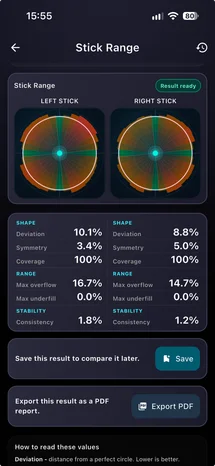
Spot stick drift, test adaptive triggers, verify motion sensors, and confirm repairs.
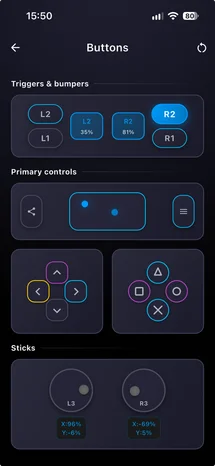
Inspect analog stick centering with live X/Y coordinates and percentage readouts to catch drift or dead zones immediately.
Confirm every face button, shoulder bumper, D-Pad direction, and touchpad press with instant visual confirmation.
Test pull depth and configure DualSense adaptive trigger resistance or Xbox impulse vibration feedback without guesswork.
Diagnose vibration motors, inspect real-time gyroscope and accelerometer movement, and preview LED indicator status.
HOW IT WORKS
No account setup or clutter - connect your controller and start testing.
Connect your PlayStation, Xbox, or MFi controller to your iPhone in seconds.
Test stick centering, trigger resistance, haptics, and motion sensors with immediate feedback.
Confirm everything works properly before a gaming session, purchase, or after hardware repair.
SENSEPAD FOR iOS
Real-time gamepad testing for PS5, Xbox, PS4, and MFi controllers.